Install Java
BoostBot runs on Java. Install both of these, even if you already have Java:
Home Get Started
BoostBotLauncher.jar is downloading. Keep this page open and follow the steps. Did not start? Download again
Six steps, in this order. Mark each one done as you go: this page remembers where you stopped.
BoostBot runs on Java. Install both of these, even if you already have Java:
BoostBot plays your game inside an Android emulator on your PC. LDPlayer 9 is the one we recommend.
Nox and MEmu also work. BlueStacks does not.
Find BoostBotLauncher.jar in your Downloads folder. Do not double-click it and do not extract it. Instead:
Right-click the file Open with Java (TM) SE Binary
Not in the list? Java is not installed yet: go back to Step 1.
The first launch downloads the bot files. Let it finish, then log in with your BoostBot account.
The free download has the basic settings. Tasks with a crown icon need a paid plan. See plans
In the Quick Start tab, select your emulator and your game, then press Save and continue.
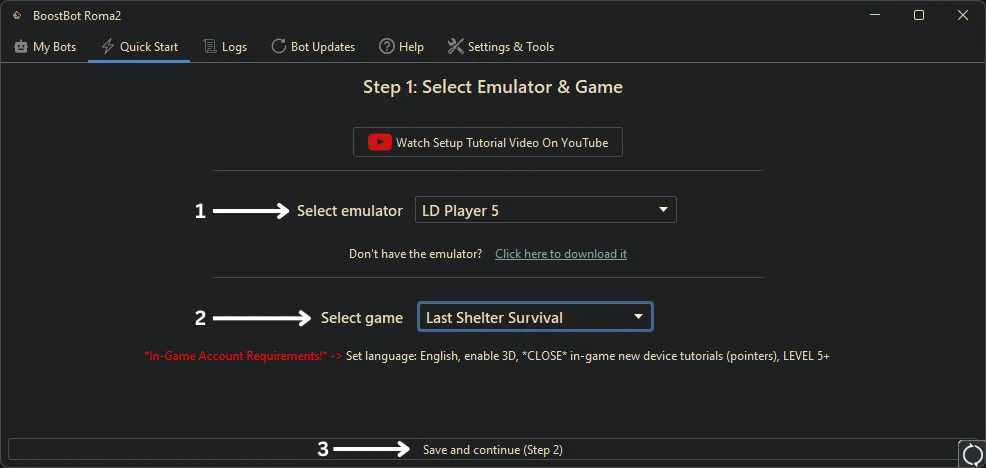
The red line under the game lists what your game account needs, such as English language and a finished tutorial. Note it for Step 6.
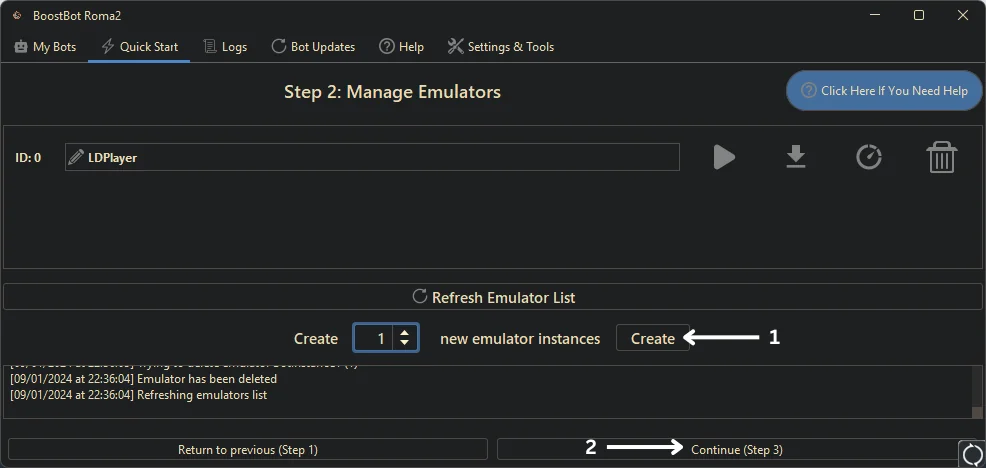
First an emulator instance: set 1, press Create, and wait. It can take a couple of minutes. Do not close the bot, and do not delete the first instance. Then press Continue.
Then a BoostBot instance: give it a name, tick the emulator it should use, press Create Instance, then Continue.
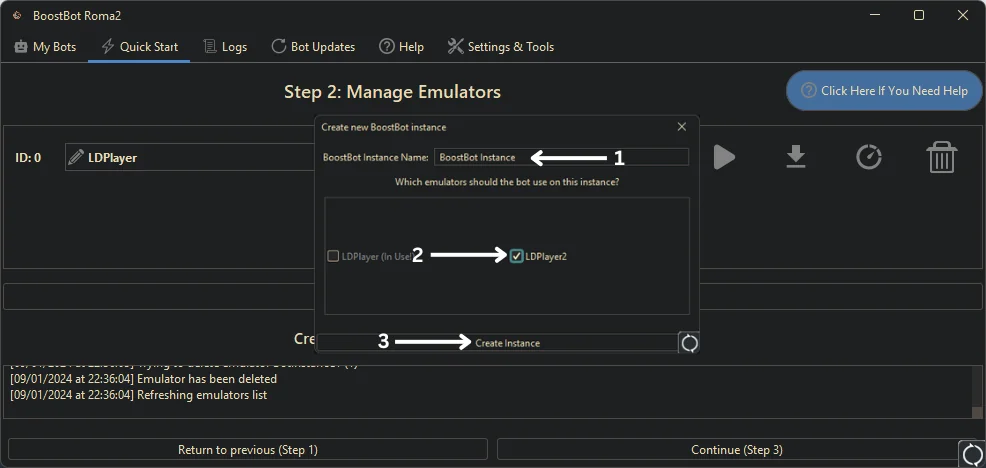
Never tick the same emulator in two BoostBot instances: they will fight over it.
In the Scripts tab, pick your game, switch on the tasks you want, and drag them into the order the bot should run them. Close the menu and save your settings.
Before you press Play, check your game account:
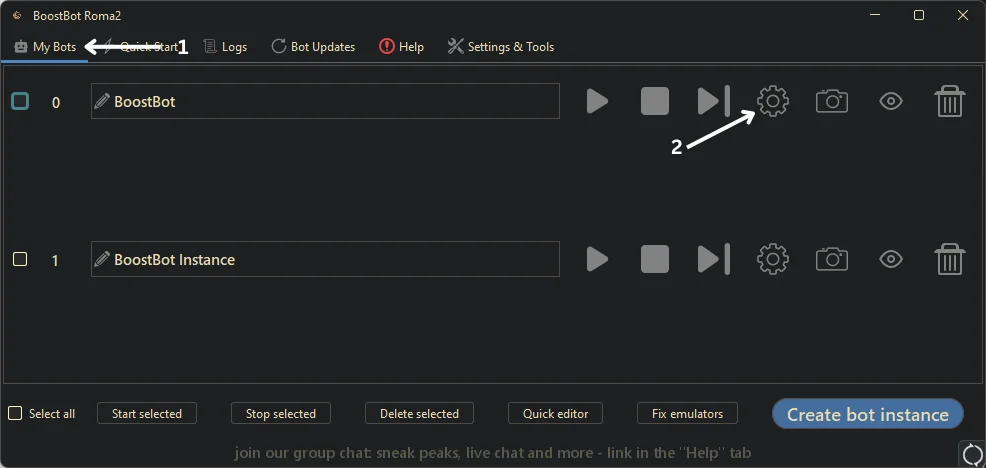
Now press Play next to your instance in My Bots. To change settings later, press the cog next to it.
Tasks with a crown icon need Premium. Get Premium
Find the message you see. Each fix is from our Common Issues guide.
Java is missing, or Windows opened the file with the wrong program. Install both the JRE and JDK 25 (Step 1), then right-click BoostBotLauncher.jar, Open with, Java (TM) SE Binary. Do not extract the .jar.
Java is not installed yet. Go back to Step 1 and install both the JRE and JDK 25.
Check you are on Windows 10 or 11, your Windows language is English, and your Windows username has English letters only. If it does not, install the bot under a new Windows user. Then delete your BoostBot folder and run it again.
Uninstall BoostBot (Control Panel, Apps, Uninstall). Restart your PC so no BoostBot process is running, download the launcher again from this page, and reinstall.
The download usually did not finish. Delete the folder C:/Users/YOUR-USER/boostbot/ and run BoostBot again.
Check the right emulator is selected in the bot's Settings, save, and restart BoostBot. Still there? Close every emulator process in Task Manager, then press Fix emulators in the My Bots tab. On LDPlayer you can also set Other settings, ADB Debugging, Open local connection.
Check the game account meets the requirements shown when you picked the game, the in-game tutorial is finished, and the game language is English. Then read the Logs tab: the bot prints what it is trying to do.
The connection to the emulator dropped, usually when CPU hits 100%. Run fewer emulators at once, never mix emulator brands at the same time, close other programs that use ADB, and check antivirus is not blocking the emulator. Restart the bot and emulator if it does not reconnect.
Use the Fix emulators option: it sets each emulator to 2 cores and 2 GB. How many emulators you can run at once depends on your RAM and storage.
No. BoostBot runs on a Windows 10 or 11 PC, inside LDPlayer, Nox or MEmu. BlueStacks and Sandboxie do not work, and virtual machines usually cannot run the emulator.
Still stuck? Open a ticket on Discord with your email and a screenshot of the Logs tab. Open Discord
No Windows PC? A Bot Server runs BoostBot in our cloud, or with Farm for Me our team runs your farm accounts.