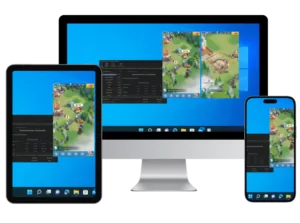
In this guide, we’ll walk you through playing Tiles Survive on PC and Mac. Tiles Survive is an immersive survival strategy game set in a post-apocalyptic world overrun by zombies. Take on the role of a survivor tasked with building a thriving settlement by managing resources, clearing tiles, and commanding heroes to fend off the undead horde.
As you enter this dangerous world, build a powerful base, recruit formidable heroes, and strategize to defeat zombie waves and rival players. Experience the excitement of Tiles Survive as you navigate resource challenges, alliance warfare, and survival decisions in a thrilling tile-based adventure. Can you play Tiles Survive on PC? Yes, and we’ll show you how to get started on your computer or laptop for an enhanced gaming experience.
 Rather not do this by hand? The Tiles Survive bot runs it on every account.See how it works
💻 Already playing on your PC? Then you are one step from automating it. The Tiles Survive bot drives the same emulator setup. See what it does.
How To Install Tiles Survive On a Windows PC
You can easily install Tiles Survive on a PC using an Android emulator like BlueStacks, MEmu, or LDPlayer.
Follow these steps to download and set up the emulator on your Windows PC:
Step 1: Download An Android Emulator
An Android emulator lets you run Android apps on your Windows computer, including Tiles Survive. Check out our recommended emulators below:
LDPlayer Emulator (Our Favorite)
LDPlayer is our top choice, user-friendly, high-performing, and reliable for running Tiles Survive smoothly.
Other Emulators
BlueStacks is widely used, but we don’t recommend it due to ads and compatibility issues. It’s not fully compatible with the BoostBot Tiles Survive bot.
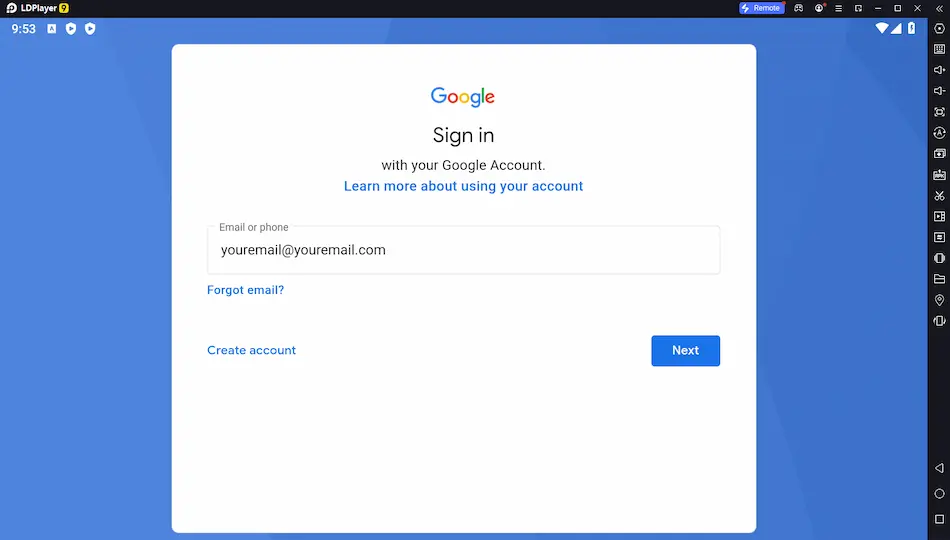
Step 2: Launch The Emulator and Sign into Your Google Account
Open the “Google Play” app within the emulator and sign in with your Google account.
Step 3: Open the Play Store and Install Tiles Survive
Install Tiles Survive as you would on your phone, search for it in the Play Store and hit install!
Step 4: Download Tiles Survive Bot
Enhance your Tiles Survive experience on PC with the Tiles Survive bot, a tool that ensures steady progress even when you’re away.
Installation is simple, just add it like any app. This bot acts as your constant ally, automating tasks like resource gathering, building upgrades, and tile clearing 24/7, saving you time and boosting efficiency in this epic survival challenge.
Want something better than a code?
It’s your secret weapon for advancing through the game without sacrificing real-world time. You’re not alone, many players use bots to streamline their experience. Try it and see the difference!
Once the game runs on your PC, the Tiles Survive bot can play it for you: gathering, building and dailies, on a schedule you set. Try it free.
Bot Tiles Survive on Multiple Accounts
For advanced play, purchase extra farm accounts and run bots on multiple accounts simultaneously on your PC.
How to Play Tiles Survive on Mac
Can I play Tiles Survive on Mac? Yes, you can enjoy this survival strategy game on your Mac using an Android emulator, just like on a Windows PC. Emulators like LDPlayer and Nox are compatible with macOS, allowing you to download Tiles Survive for PC gameplay on your Mac with ease.
Follow these steps to set up Tiles Survive on your Mac:
Step 1: Download a Mac-Compatible Emulator
Choose an emulator that supports macOS, such as LDPlayer or Nox. Visit their official websites to download the macOS version of the emulator.
Step 2: Install and Configure the Emulator
Run the installer, follow the on-screen instructions, and launch the emulator. Sign into your Google account via the Google Play Store within the emulator to access apps.
Step 3: Install Tiles Survive
Search for Tiles Survive in the Google Play Store and click install. Once downloaded, launch the game and start your survival adventure on your Mac.
Step 4: Automate Tiles Survive (Windows Only)
The BoostBot client runs on Windows 10 and 11, so it will not install on macOS. Mac players have two routes: rent a Bot Server, a Windows machine that runs the bot around the clock and comes with a licence, or hand it over with Farm for Me and we run Tiles Survive for you.
Why Play Tiles Survive on PC or Laptop?
Playing Tiles Survive on PC or laptop offers a superior gaming experience compared to mobile devices. With a larger screen, you can fully appreciate the game’s detailed tile maps and intricate base-building visuals. Using a keyboard and mouse provides precise control, making it easier to manage resources, command heroes, and strategize against zombie hordes.
A Tiles Survive PC emulator like LDPlayer or Nox ensures smooth performance, reducing lag and battery drain that mobile devices often face during extended play. Plus, you can multitask, run the game alongside other apps or use the BoostBot Tiles Survive bot to automate tasks while you work or relax. Whether you’re downloading Tiles Survive on a laptop or desktop, the PC setup elevates your survival adventure.
| Emulator | Windows Support | Mac Support | Bot Compatibility | Ease of Use |
|---|---|---|---|---|
| LDPlayer | Yes | Yes | High | Very Easy |
| Nox | Yes | Yes | Moderate | Easy |
| MEmu | Yes | No | Moderate | Moderate |
| BlueStacks | Yes | Yes | Low | Moderate |
The reason to play on PC. A bigger screen is nice; a Tiles Survive bot that keeps farming while you work is better. Start free.
What Is Tiles Survive on PC?
Launch your Tiles Survive adventure on PC and Mac, stepping into a survival strategy game set in a post-apocalyptic world. Available across multiple platforms including mobile, Tiles Survive challenges you to lead a group of survivors to safety amidst zombie-infested lands, managing resources and heroes in a relentless battle for survival.
Tiles Survive blends an engaging survival narrative with base-building and hero management, delivering a dynamic gaming experience. As a leader, you’ll fortify your settlement, assemble a team of heroes, and make critical decisions to ensure your community thrives. Its immersive storyline and strategic depth captivate players on any device.
Featuring stunning graphics, Tiles Survive brings the post-apocalyptic battlefield to life with vivid detail. Whether you’re playing on a smartphone, tablet, or other supported devices, the game offers a seamless and engrossing experience. Stay sharp as you make strategic choices that shape your settlement’s fate in this epic world.
What Are The System Requirements For Tiles Survive?
Ensure a smooth Tiles Survive experience by meeting the minimum system requirements. Your device needs at least 4GB RAM and a dual-core CPU to handle the game’s strategic demands.
The 4GB RAM ensures quick loading and lag-free gameplay, while the dual-core CPU manages processing needs, delivering a seamless survival adventure in Tiles Survive’s zombie-filled world.
These specs aren’t just technicalities, they’re the foundation for crisp graphics, stable frame rates, and responsive gameplay across platforms. Meet these requirements to thrive in Tiles Survive.
Prefer BoostBot on Google so our code lists and guides show up first when you search.
Add BoostBot on Google